Why Can't Your Anti-Detect Browser Play Netflix? ixBrowser Has the Answer
If you've ever tried to listen to music on Spotify Web or log in to Netflix to watch shows in an anti-detect browser, you've likely encountered a black screen, error codes, or endless loading. The root cause is often not the network or the account, but a missing key component in the browser kernel—Widevine CDM. The "CDM Playback Kernel" newly added in the latest version of ixBrowser is designed precisely to address this pain point.
What is Widevine DRM Copyright Protection?
Widevine is a digital rights management (DRM) system developed by Google, specifically designed to protect streaming content from being freely downloaded or pirated. Mainstream platforms such as Netflix, Spotify, Disney+, Amazon Prime Video, as well as YouTube's paid content, almost all rely on Widevine behind the scenes to control who can watch, on what devices they can watch, and what resolution they can watch at. Its working method is not simply encrypting the video, but embedding a component called CDM (Content Decryption Module) in the browser, which is responsible for requesting keys from the license server and completing decryption and playback locally.
The key point is that Widevine CDM is not included by default in all Chromium kernels. Regular Chrome browsers come with this module built in, but many anti-detect browsers and automation browsers based on secondary development of Chromium remove Widevine CDM to reduce size or avoid licensing issues. The result is: the website detects that the browser claims to be Chrome, but it fails the DRM capability check, and the streaming platform directly refuses playback. This is why when you open Spotify or Netflix in ixBrowser, the page can load, but as soon as you press play, problems occur.

How to Verify Whether the CDM Playback Kernel Is Working?
To confirm whether the CDM playback kernel is truly effective, the most direct method is to use the Widevine test page provided by the DASH Industry Forum. This page loads a test stream protected by Widevine. If the browser has a usable CDM, the video will play normally; if the CDM is missing, the page will report an error or get stuck.
The test address is https://reference.dashif.org/dash.js/v4.7.3/samples/drm/widevine.html. After opening it, the page will automatically initialize the dash.js player and attempt to request a Widevine license. Under the CDM playback kernel, you can see the video begin buffering and play smoothly; if you switch back to the regular kernel, the play button cannot be clicked and the video cannot load properly.
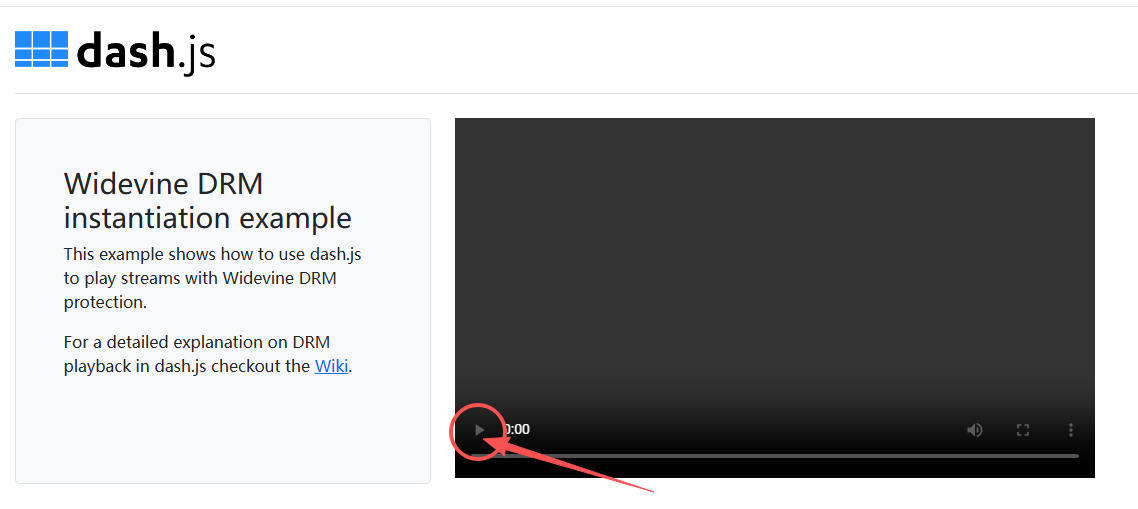
Regular kernel: The play button cannot be clicked, and the video does not load.
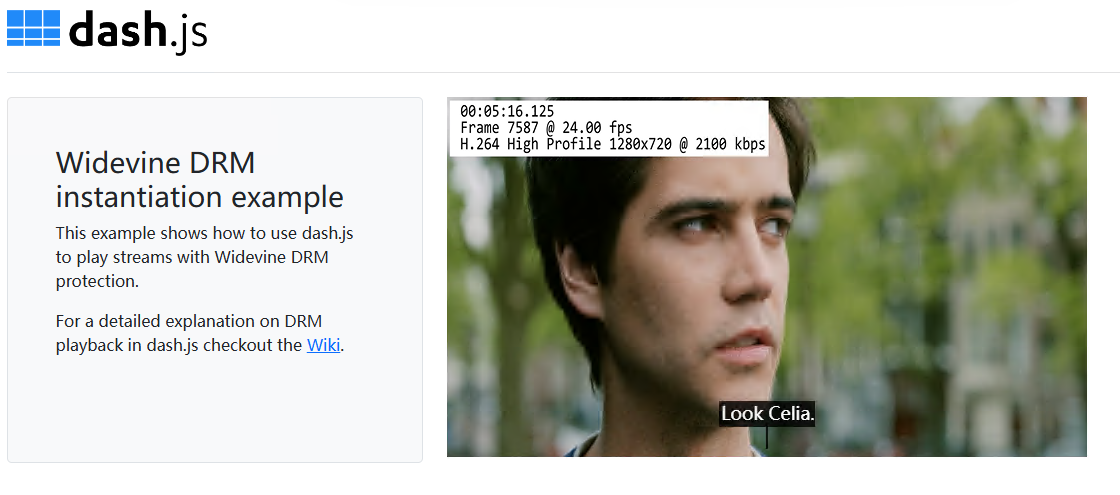
CDM kernel: The video plays normally.
How to Enable the CDM Playback Kernel?
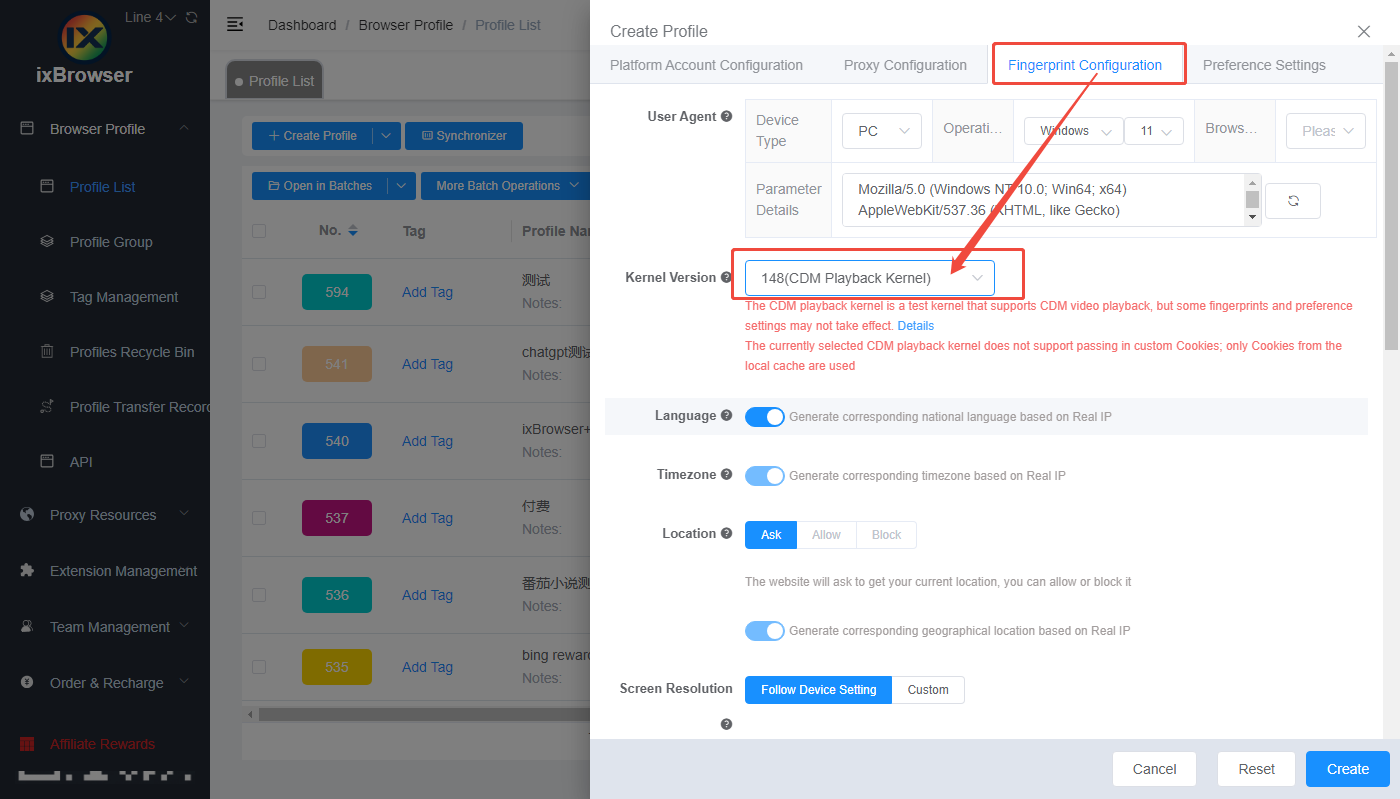
Enabling it is not complicated. When creating a profile, find the Kernel Version configuration item in the Fingerprint Configuration interface, and select 148 (CDM Playback Kernel) from the dropdown menu.
Notes:
1.The CDM playback kernel is a test kernel. It supports CDM video playback, but some fingerprint and preference settings may not take effect. It also does not support passing in custom Cookies; when enabled, the profile will only use Cookies from the local cache. Therefore, before use, please test on a small scale first and then expand the scope of use based on actual conditions.
2.The CDM playback kernel is only supported in v2.10.22 and above. If you want to use this kernel, please update in the Software Settings page or manually download the latest version from our official website (https://ixbrowser.com/en/download-page).
What is Widevine DRM Copyright Protection?
Widevine is a digital rights management (DRM) system developed by Google, specifically designed to protect streaming content from being freely downloaded or pirated. Mainstream platforms such as Netflix, Spotify, Disney+, Amazon Prime Video, as well as YouTube's paid content, almost all rely on Widevine behind the scenes to control who can watch, on what devices they can watch, and what resolution they can watch at. Its working method is not simply encrypting the video, but embedding a component called CDM (Content Decryption Module) in the browser, which is responsible for requesting keys from the license server and completing decryption and playback locally.
The key point is that Widevine CDM is not included by default in all Chromium kernels. Regular Chrome browsers come with this module built in, but many anti-detect browsers and automation browsers based on secondary development of Chromium remove Widevine CDM to reduce size or avoid licensing issues. The result is: the website detects that the browser claims to be Chrome, but it fails the DRM capability check, and the streaming platform directly refuses playback. This is why when you open Spotify or Netflix in ixBrowser, the page can load, but as soon as you press play, problems occur.
How to Verify Whether the CDM Playback Kernel Is Working?
To confirm whether the CDM playback kernel is truly effective, the most direct method is to use the Widevine test page provided by the DASH Industry Forum. This page loads a test stream protected by Widevine. If the browser has a usable CDM, the video will play normally; if the CDM is missing, the page will report an error or get stuck.
The test address is https://reference.dashif.org/dash.js/v4.7.3/samples/drm/widevine.html. After opening it, the page will automatically initialize the dash.js player and attempt to request a Widevine license. Under the CDM playback kernel, you can see the video begin buffering and play smoothly; if you switch back to the regular kernel, the play button cannot be clicked and the video cannot load properly.
Regular kernel: The play button cannot be clicked, and the video does not load.
CDM kernel: The video plays normally.
How to Enable the CDM Playback Kernel?
Enabling it is not complicated. When creating a profile, find the Kernel Version configuration item in the Fingerprint Configuration interface, and select 148 (CDM Playback Kernel) from the dropdown menu.
Notes:
1.The CDM playback kernel is a test kernel. It supports CDM video playback, but some fingerprint and preference settings may not take effect. It also does not support passing in custom Cookies; when enabled, the profile will only use Cookies from the local cache. Therefore, before use, please test on a small scale first and then expand the scope of use based on actual conditions.
2.The CDM playback kernel is only supported in v2.10.22 and above. If you want to use this kernel, please update in the Software Settings page or manually download the latest version from our official website (https://ixbrowser.com/en/download-page).